The morning question
“Why is it already dark at 4:30 in December?” Open “Seasons”, place Earth at the December solstice, and the class sees which hemisphere leans toward the Sun. The answer is built on screen, not read from a textbook.
We would like to measure visits to these pages with Google Analytics: how many people come, from where, and whether they open the board. Nothing loads until you accept, and the classroom board is never measured. Learn more
The Sun, the planets and their moons in three dimensions, on today’s date, with 8 modules for the big questions of primary school: why does night fall, where do seasons come from, why does the Moon change shape, why does the sea rise. The scene turns and responds to touch on the interactive board, and all of it is free.
This is not a screenshot: it is the tool itself, the one your class will see on the board.
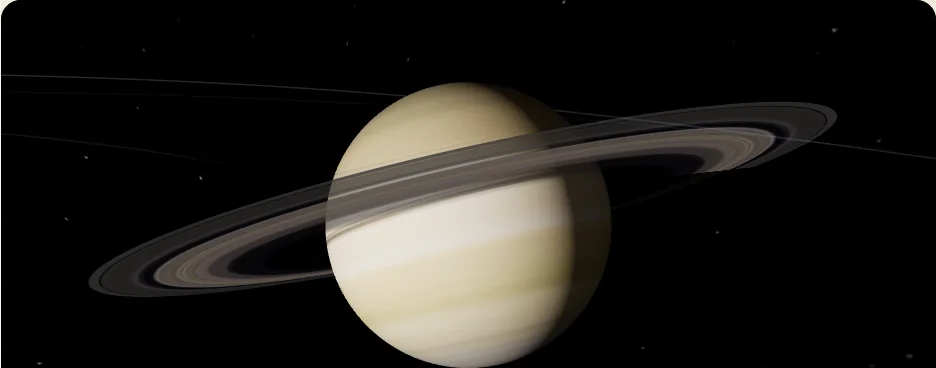
The planets sit where they are today around the Sun. Tapping a body flies the camera to it: its surface, its atmosphere, its fact sheet and a few “Did you know?” lines. “Start time” runs the days forward, from one day to one year per second, and the calendar goes back or ahead from 1800 to 2050.
The “Earth, Moon, Sun” module brings together the three curriculum questions. A marker turns with Earth and moves from day into night; the tilted axis keeps its direction as Earth travels around the Sun; the Moon circles Earth while a small view shows the phase seen in the sky.
The Moon’s shadow slides across Earth while a second view shows the Sun being covered, right up to the corona. For a lunar eclipse, the Moon enters Earth’s shadow and turns copper. Ages 8–12 also find out why there is no eclipse every month.
In “Tides”, Earth turns beneath two bulges of water lined up with the Moon, and the sea-level curve is drawn alongside. In “Gravity”, a probe is launched: too slow, it falls back; fast enough, it goes into orbit; faster still, it escapes. The same jump is also compared on the Moon, on Mars and on Earth.
“Compare” sets two bodies side by side, at the same scale, with the numbers that matter. “Moons” shows each planet’s main moons orbiting it: Io and its volcanoes, Europa and its hidden ocean, Titan and its atmosphere.
“Scales” follows a ray of light from the Sun to a planet, in real time or sped up. And “The solar system in the schoolyard” works out the scale model to build outside: with a ball as the Sun, the size of each planet and how many metres away to place it.
The “Ages 6–8” setting keeps the essentials, with short sentences and few controls; “Ages 8–12” adds vocabulary, numbers and a few more settings. Each module offers an activity: a question, an experiment to run on screen, and the answer, folded away so the class thinks first.
“Why is it already dark at 4:30 in December?” Open “Seasons”, place Earth at the December solstice, and the class sees which hemisphere leans toward the Sun. The answer is built on screen, not read from a textbook.
Pick the ball that will play the Sun, note the distances worked out, and go outside: Earth is a small bead a few dozen steps away, Neptune is at the end of the street. Students walk the distance, and the emptiness between planets stays with them.
The day before an event everyone is talking about, the module shows what is happening up there, seen from space and seen from here. It is also the moment to repeat the safety rule the screen displays: never look at the Sun without eclipse glasses.
“Lock the view” stops the scene turning under fingers: a student can come up to move time forward or drag the Moon without upsetting everything. “Names” hides with one tap, to have the class guess a planet.
These are models for understanding, not a planetarium. The tool predicts the date of no eclipse, gives the tide times of no port and does not show the sky of any place; the starry background is decoration. Planet positions are accurate for a classroom, not for a telescope.
In nearly every module, sizes and distances are enlarged or squeezed to fit the screen, and each module says so. True proportions are in “Scales” — that is the very reason it exists.
The planet maps come from NASA data, but those of Uranus, Neptune and the clouds of Venus are reconstructions: no spacecraft has photographed their whole surface. Several small moons have no complete map either; they are drawn, and their fact sheet says so.
The tool is in beta: it has not yet been tried with a class on a real interactive board. It needs a device able to display 3D; on an older computer, it lowers the image detail by itself to stay smooth. It saves nothing and does not know the student list.
No. The Solar system opens in the browser, from the Kliip board, with no account and nothing to install. It loads when the tool is opened, not before: the other tools on the board are not slowed down.
Yes, all of it: the 8 modules, both levels and the activities, with no time limit. It counts as one tool among the 3 that the free plan lets you place together on the composable canvas.
The planet maps are from Solar System Scope, under the CC BY 4.0 licence, built from NASA data; the moon maps come from NASA. Diameters, distances and durations come from JPL and NASA tables, and moon counts are dated, because they rise every year.
Primary school, ages 6 to 12, with two settings: “Ages 6–8” and “Ages 8–12”. These ages are guides for pitching vocabulary and the number of controls; they do not match any one curriculum, and you choose the one that suits your group.
Yes. Drag to turn around a body, pinch to move closer, tap a planet to visit it, and every control is a large button. Everything also works with a mouse and a keyboard. “Lock the view” freezes the camera when a student comes to the board.
Yes, to open the tool and to load a module the first time: the planet maps are images. Once a module has loaded, it keeps working if the connection drops during the lesson.
This tool lives on the board’s canvas, next to all the others.